What Are the Best Features of Microsoft Surface?
Are you looking for a device that combines power, style, and versatility? The Microsoft Surface lineup has become one of the most popular choices for students, professionals, and creative users alike. In this article, we will explore the best features of Microsoft Surface devices that make them stand out in today’s competitive market. Whether you need a laptop for work, school, or entertainment, understanding these features will help you make the right choice.
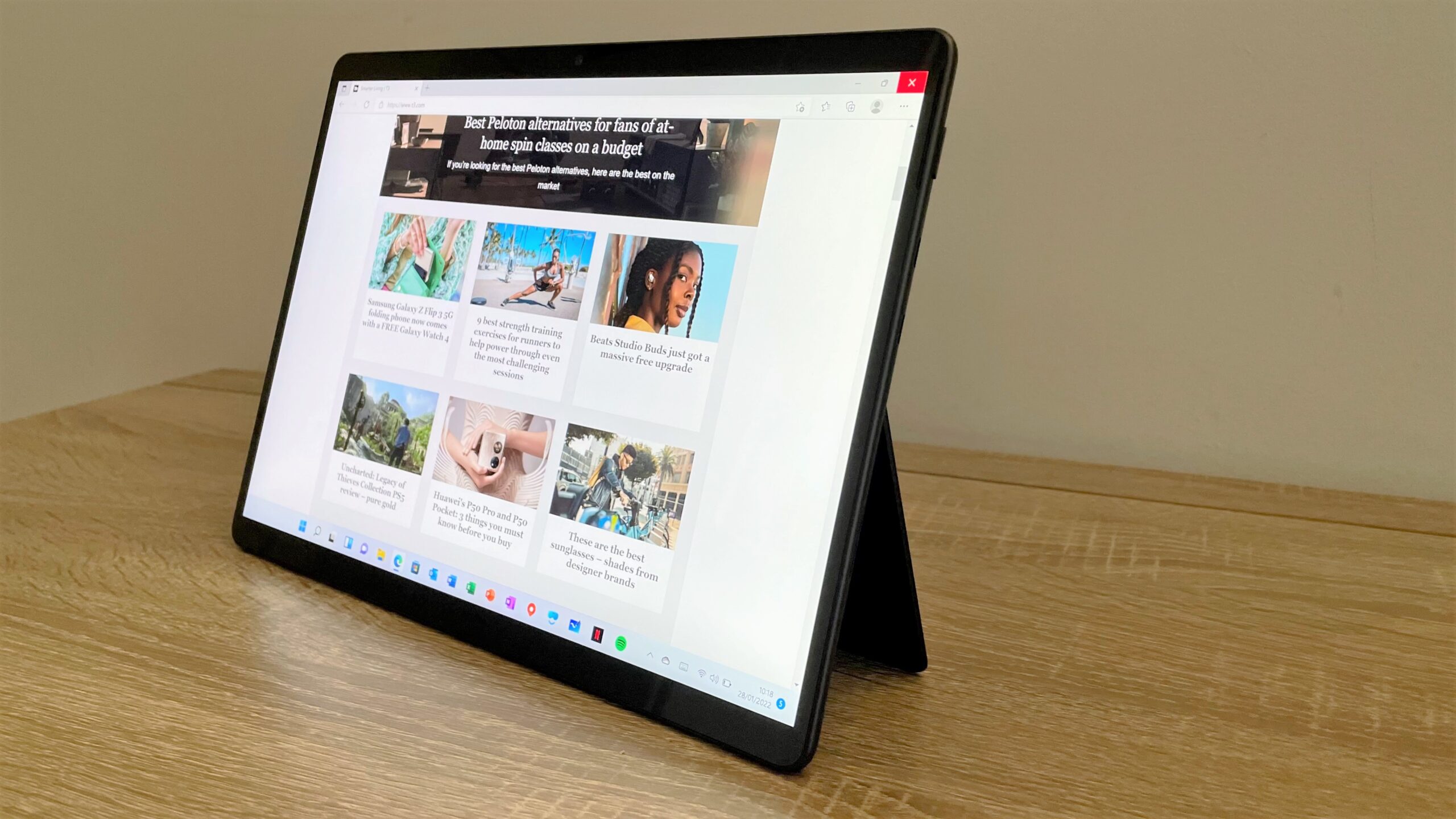
Microsoft has worked hard to create devices that meet the needs of modern users. As a result, the Surface family offers something for everyone. From stunning displays to powerful AI capabilities, let’s dive into what makes these devices so special.
Outstanding PixelSense Display Technology
What Makes the PixelSense Display Special
One of the best features of Microsoft Surface devices is the remarkable PixelSense display. The brilliant PixelSense touchscreen with 120 Hertz refresh rate and HDR delivers richer blacks, crisper whites, and vibrant colors. This means you get smooth visuals whether you are watching movies, editing photos, or simply browsing the web.
Moreover, thin bezels and 3:2 aspect ratio maximize your screen space. This taller aspect ratio gives you more room to work with documents and websites compared to traditional widescreen displays. Consequently, you can see more content without scrolling as much.
Display Options for Every Need
Available with 12-inch and 13-inch PixelSense displays, Surface Pro devices give you AI-accelerated experiences. Additionally, Surface Pro 11th Edition features a 13-inch OLED touchscreen with an optional 1M:1 contrast ratio. This high contrast means deeper blacks and more vivid colors, which is perfect for creative professionals.
The Surface Laptop features a PixelSense Flow Display with resolution of 2304 x 1536 pixels, 3:2 aspect ratio, 1400:1 contrast ratio, and dynamic refresh rate up to 120Hz. Furthermore, each display is individually color-calibrated, so you get accurate colors right out of the box.
Powerful AI and Processing Capabilities
Next-Generation Processors
Another one of the best features of Microsoft Surface is the powerful processing power inside these devices. Surface Laptop 7th Edition is equipped with Qualcomm’s Snapdragon X Plus or X Elite processor, which delivers impressive lightning-fast performance and makes it suitable for a variety of tasks.
The devices are ultrabook-fast, AI-smart, versatile, and fanless. This fanless design means your Surface stays quiet even during heavy workloads. Therefore, you can focus on your work without the distraction of loud fans.
AI-Powered Experiences
The laptop’s impressive NPU performs up to 45 trillion operations per second. This neural processing unit enables smart AI features that help you work more efficiently. Surface Laptop 7th Edition also shines with its unique AI-powered features like Recall, Live Captions, and Windows Studio Effects designed to make your computing experience smoother and more efficient.
Microsoft’s strategy is to ensure that both commercial and mainstream Surface hardware buyers can take advantage of the new AI features in Windows, including powerful real-time transcription, local image generation, and the Recall feature. These smart tools can help you find information quickly and communicate better.
Exceptional Battery Life for All-Day Use
Long-Lasting Performance
Battery life is certainly one of the best features of Microsoft Surface that users appreciate most. Surface Laptop provides the longest battery life compared to previous Surface Laptops, with up to 20 hours of video playback. This impressive battery life means you can work all day without worrying about finding a power outlet.
Surface Pro 11th Edition boasts up to 14 hours of local video playback. As a result, you can take your Surface on trips, to classes, or to meetings without bringing a charger everywhere you go.
Efficient Design
The Snapdragon X family of CPUs sought to provide the best performance, improved battery life, and lower heat output as compared to x86 Surface devices. This efficient chip design gives you both power and long battery life at the same time. Consequently, you do not have to choose between performance and portability.
Versatile 2-in-1 Design
Laptop and Tablet in One
The best features of Microsoft Surface include its flexible design options. You can express yourself with touch, voice, or pen on your Surface Pro PixelSense touchscreen display. The 2-in-1 design gives you the best of a laptop and a tablet, all in one device.
You can easily switch orientation for browsing, taking notes, or creating. This flexibility makes the Surface perfect for different work styles and situations. Whether you prefer typing on a keyboard or tapping on a screen, the Surface adapts to your needs.
Premium Keyboard Experience
You can easily transform your Surface Pro to a full laptop with Surface Keyboard. The keyboards are designed to provide a comfortable typing experience. Reimagined with a smooth-matte palm rest, sturdy wedge design, and dynamic hinge, Surface Pro is great for typing anywhere, even on your lap.
Surface Pen for Creative Excellence
Natural Writing and Drawing
The Surface Pen represents one of the best features of Microsoft Surface for creative users. Writing and drawing with Surface Pen feels natural, with precision ink on one end and a rubber eraser on the other.
Building on advanced technologies, the Surface Pen features 4,096 levels of pressure sensitivity, tilt support for natural shading, and nearly imperceptible inking latency to enhance precision in writing and drawing. These features make digital art and note-taking feel almost like using real pen and paper.
Advanced Features for Professionals
Precise tilting and 4,096 points of pressure sensitivity deliver an incredible shading experience. You can feel the difference with customizable haptic feedback, which adapts to whether you’re using a thin brush or a thick marker.
Surface Slim Pen has up to 15 hours of battery life and magnetically charges wirelessly with Surface Laptop Studio, select Surface Pro keyboards, and the 12-inch Surface Pro. Additionally, palm rejection technology lets you rest your hand on the screen without causing unwanted marks.
Premium Build Quality and Portability
Lightweight and Durable Design
Among the best features of Microsoft Surface is the premium construction that users love. Surface Laptop starts at just 2.96 lbs (1.34 kg). This lightweight design makes it easy to carry your device wherever you go.
Surface Pro 11th Edition is ultra-portable, weighing 1.97 pounds (895 grams). Despite this light weight, the devices feel solid and well-built. Therefore, you get both portability and durability in one package.
Beautiful Color Options
Surface Pro 11th Edition comes in four different colors: Sapphire, Dune, Black, and Platinum. These stylish options let you choose a device that matches your personal style. Similarly, Surface Laptop 13.8″ is available in Sapphire, Dune, Black, and Platinum.
Modern Connectivity Options
Comprehensive Port Selection
With 2 USB-C/USB4 ports that support charging, data transfer, and DisplayPort 2.1, you can connect up to two 4K monitors. This connectivity makes the Surface perfect for both mobile work and desktop setups.
The devices offer port variety to support accessories and up to two 4K monitors. Furthermore, Surface Pro 11th Edition includes Wi-Fi 7 and optional 5G connectivity. As a result, you can stay connected wherever you are.
Wireless Technology
For the first time, the Surface Laptop device comes with 5G connectivity. This feature allows you to connect to the internet without relying on Wi-Fi hotspots. Consequently, you can work from almost anywhere with cellular coverage.
Enhanced Camera and Video Calling
Professional Video Quality
With its AI-enhanced, full HD Surface Studio Camera, Surface Laptop seamlessly pairs with Windows Studio Effects that’ll level up your video calls. This is important for anyone who attends online meetings regularly.
Surface devices feature a PixelSense touchscreen display and HD front-facing camera, so you’ll look your best on video and conference calls. The camera delivers true-to-life video that adjusts to light and posture changes, and the Studio Mics and Omnisonic Speakers will help you sound great too.
Repairability and Sustainability
Easy to Service Design
Microsoft has also focused on making the best features of Microsoft Surface include repairability. Microsoft has released service guides for Surface Laptop 7 and Surface Pro 11. iFixit has given both devices an overall rating of 8/10 on the repairability scale.
This high repairability score means you can get your device fixed more easily if something goes wrong. Moreover, many components can be replaced by skilled technicians, which supports a more sustainable approach to technology.
Windows 11 and Software Integration
Complete Operating System Experience
Every Surface Pro 11th Edition comes with Windows 11 complete with the latest in security, productivity, and gaming features, as well as the latest Copilot in Windows.
Microsoft claims that 90% of total app minutes that users spend in apps now have native ARM versions. This means most popular apps work smoothly on Surface devices. Google released Chrome on ARM in 2024, and Adobe has been rolling out ARM native apps for Photoshop, Illustrator, and Premiere Pro.
Conclusion
In summary, the best features of Microsoft Surface make these devices excellent choices for many different users. From the stunning PixelSense displays to powerful AI capabilities, from exceptional battery life to versatile 2-in-1 designs, Surface devices offer remarkable value.
The combination of premium build quality, creative tools like the Surface Pen, and modern connectivity options creates a complete package for work and play. Whether you are a student, professional, or creative artist, there is likely a Surface device that fits your needs perfectly.
If you are looking for a device that balances power, portability, and style, the Microsoft Surface lineup deserves your consideration. These devices continue to push the boundaries of what portable computers can do.
References:
For more technology insights and digital news, visit: