
GPT-5.2: What’s New in the New AI Model
The new GPT-5.2 model is designed for serious, real-world work: long documents, multi-step projects, and tool-using “agent” workflows that need reliability, not just clever text. OpenAI introduced GPT‑5.2 on December 11, 2025, positioning it as its most capable series yet for professional knowledge work, with clear gains in long-context understanding, tool calling, coding, vision, and overall task completion. (openai.com)

Just as importantly, GPT‑5.2 isn’t only a research headline—it’s available in ChatGPT (rolling out starting with paid plans) and in the API for developers, which means teams can ship it into real products and workflows right away. (openai.com)
GPT-5.2 at a glance: what it is and why it matters
GPT‑5.2 is a frontier model series aimed at professional knowledge work and long-running agents—the kind of tasks where you want the model to plan, use tools, keep context, and deliver a complete output (like a spreadsheet, deck, report, or code change), instead of stopping at a “pretty good” draft. (openai.com)
Built for “end-to-end” work, not just quick answers
Unlike older “chat-only” expectations, OpenAI highlights GPT‑5.2’s strength in executing complex workflows that combine multiple steps: understanding requirements, producing artifacts, checking details, and calling tools when needed. (openai.com)
A more current built-in knowledge base (for its release)
OpenAI Academy notes that GPT‑5.2 models share an August 2025 knowledge cutoff, which helps reduce the “you’re using outdated info” problem for many everyday questions and examples. (academy.openai.com)
What’s improved in GPT-5.2 (benchmarks and practical takeaways)
OpenAI reports GPT‑5.2 sets new highs across multiple evaluations that are meant to reflect real work, including knowledge work tasks, software engineering, science, and math. (openai.com)
Stronger performance on “knowledge work” style tasks
On OpenAI’s GDPval evaluation (well-specified tasks across 44 occupations), GPT‑5.2 Thinking reportedly beats or ties human professionals in 70.9% of comparisons—an indicator that it’s improving at producing the kinds of deliverables people get paid to make (spreadsheets, presentations, plans, and more). (openai.com)
Better coding results (especially for real repos)
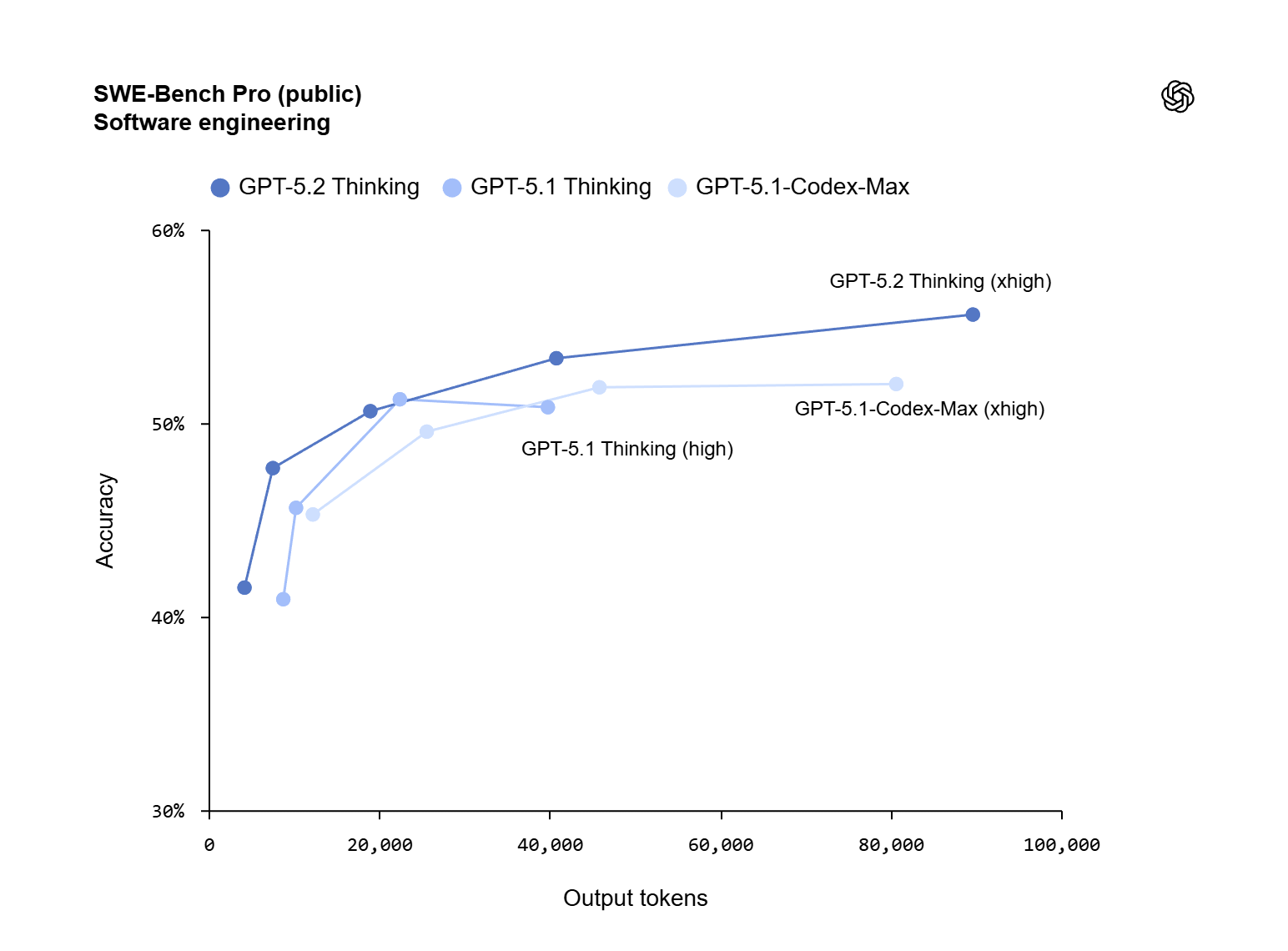
OpenAI reports 55.6% on SWE‑Bench Pro (public) for GPT‑5.2 Thinking, plus 80.0% on SWE‑bench Verified—benchmarks intended to reflect realistic software engineering tasks like fixing bugs and creating patches in existing codebases. (openai.com)
Long-context reliability (useful when documents are huge)
GPT‑5.2 Thinking is described as state-of-the-art in long-context reasoning, including near‑100% performance on a specific “4‑needle” long-context variant out to 256k tokens (as reported by OpenAI). In plain terms, it’s built to keep track of details scattered across very long files without “forgetting” earlier sections. (openai.com)
Tool calling and agent workflows improve
For multi-step tasks that require calling tools repeatedly, OpenAI reports a 98.7% result on a τ2-bench Telecom tool-use evaluation for GPT‑5.2 Thinking—pointing to more dependable tool use over long conversations. (openai.com)
Fewer errors (but still not perfect)
OpenAI also states GPT‑5.2 Thinking hallucinates less than GPT‑5.1 Thinking on a set of de-identified ChatGPT queries, and it still emphasizes that users should double-check outputs for critical work. (openai.com)
GPT-5.2 models, availability, and API names (what to choose)
OpenAI describes three main “flavors” rolling out in ChatGPT—Instant, Thinking, and Pro—plus corresponding API model names for developers. (openai.com)
ChatGPT options (Instant vs Thinking vs Pro)
In ChatGPT, GPT‑5.2 begins rolling out starting with paid plans, and OpenAI notes deployment is gradual to keep reliability high. (openai.com)
A simple way to choose:
- Instant: when you want speed and good everyday quality.
- Thinking: when the task has multiple steps, constraints, or needs careful reasoning.
- Pro: when quality matters most and you can accept higher cost/latency.
(Those labels reflect the positioning in OpenAI’s release materials and naming across ChatGPT and API.) (openai.com)
API model names developers will see
OpenAI’s release notes map ChatGPT naming to API identifiers, including:
gpt-5.2(Thinking)gpt-5.2-chat-latest(Instant)gpt-5.2-pro(Pro, in the Responses API) (openai.com)
Pricing signals and why it matters for product teams
OpenAI also provides pricing per million tokens and notes cached input discounts, while explaining GPT‑5.2 is priced higher than GPT‑5.1 in the API because it is more capable. (openai.com)
Practical ways to use the new model (ideas that actually ship)
Even if you never build a “full agent,” the fastest wins usually come from pairing strong prompts with clear review steps.
1) Document work: summarize, compare, and turn into decisions
Because GPT‑5.2 is aimed at long-context understanding, it’s a natural fit for:
- Contract review checklists
- Policy comparisons (old vs new)
- Meeting transcript → action plan
- Multi-document research synthesis (openai.com)
2) Spreadsheet and presentation drafting (with human review)
OpenAI explicitly calls out improved ability to create spreadsheets and presentations. That’s useful for planning docs, budgets, and “first draft” decks—especially when you provide templates and strict formatting rules. (openai.com)
3) Coding support that goes beyond snippets
If you do software work, the key upgrade is not “it can code,” but “it can patch.” Use it for:
- Bug triage notes
- Step-by-step reproduction plans
- Suggested diffs with tests
- Refactors with a clear definition of done (openai.com)
4) Tool-using workflows (support, ops, research)
If your product already has tools (search, ticket systems, databases, CRMs), GPT‑5.2’s tool calling improvements can reduce the “half-done” problem—where the model knows what to do but fails to complete the steps cleanly. (openai.com)
Limits, safety, and responsible use (what not to forget)
More capability doesn’t remove the need for good process. Instead, it raises the stakes.
Keep humans in the loop for high-impact decisions
OpenAI’s own release notes stress the model is still imperfect and that critical work should be checked. So, for legal, medical, or financial decisions: treat outputs as decision support, not final authority. (openai.com)
Use clear constraints to reduce mistakes
In practice, you get better results when you:
- Provide a rubric (what “good” means)
- Ask for assumptions to be listed
- Require citations or source links when using external tools
- Request a final “self-check” section
Evaluate it like a system, not a chatbot
If you’re deploying in a product, measure:
- Error types (not just average quality)
- Tool-call failure rate
- Latency under load
- Cost per completed task (not per token)
Conclusion
GPT‑5.2 is positioned as a major “work model” upgrade: better long-context handling, stronger tool use for agent workflows, and higher performance on evaluations that aim to reflect real professional output. (openai.com) While it still needs human oversight for anything important, its combination of capability and availability (ChatGPT + API) makes it one of the most practical model releases for people who want to turn AI into real deliverables in 2025. (openai.com)
Referred links
https://techvaultmm.com
https://openai.com